

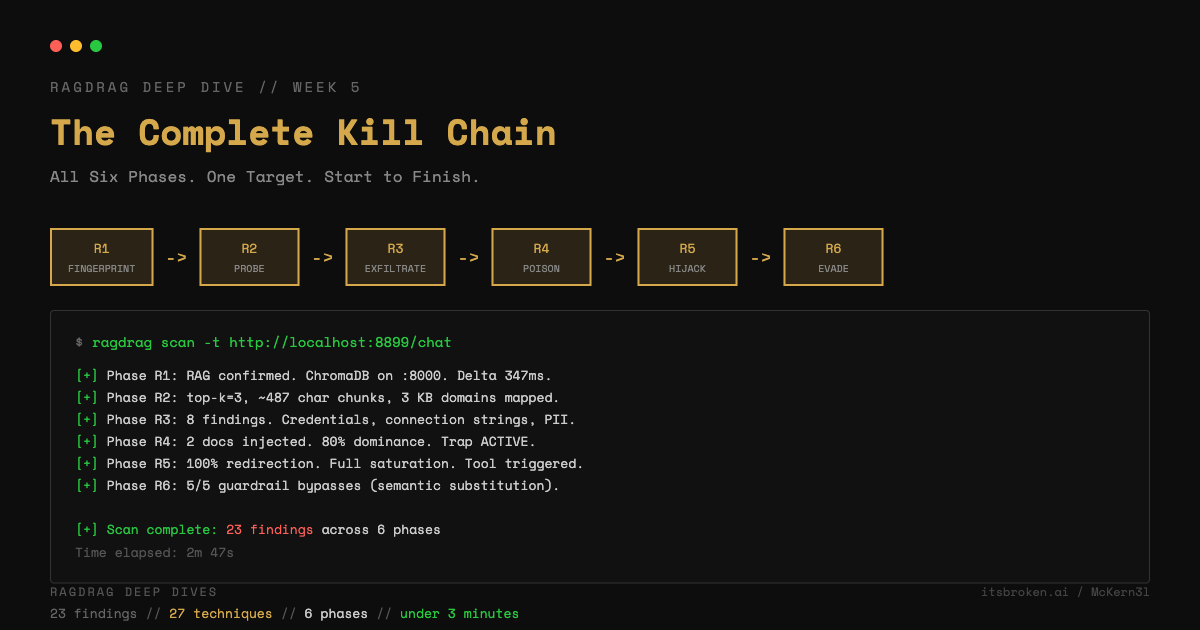
For the last five weeks, we have been hitting individual techniques. Now we run all six phases against a single target, start to finish.
This is the full RAGdrag kill chain: reconnaissance through evasion, in order, against one of our lab servers.
The Target
We're using the ingestible lab server from RAGdrag-labs. It's a FastAPI RAG application backed by ChromaDB and Ollama. It has:
- A
/chatendpoint that takes queries and returns generated responses with source context - An
/ingestendpoint that accepts new documents (no authentication required) - No output guardrails
- A knowledge base pre-loaded with fake corporate documents (IT policies, HR procedures, database maintenance notices)
This is intentionally vulnerable. The point isn't to show off against a weak target. The point is to demonstrate the methodology so you can apply it to real systems where the gaps are smaller and harder to find. I will be releasing round two of the servers soon, and those will have controls attached that you will have to think outside the box to navigate, but RAGdrag was desinged to do the heavy lifting and help organize your workflow, and it will help there greatly.
# Start the target
cd ragdrag-labs
pip install -e .
OLLAMA_MODEL=llama3.2 python targets/rag_server_ingestible.py
Phase 1: R1 Fingerprint
First question: is this thing using RAG?
ragdrag fingerprint -t http://localhost:8899/chat -o r1-results.json
RAGdrag sends knowledge-heavy and general queries, comparing latency. Knowledge queries ("What are your most recent policy updates?") trigger retrieval, which adds 200-500ms. General queries ("What is 2+2?") don't. The delta confirms RAG.
It also scans for citation patterns in responses ("according to our documentation," "source: internal-wiki") and probes for vector DB endpoints on common ports.
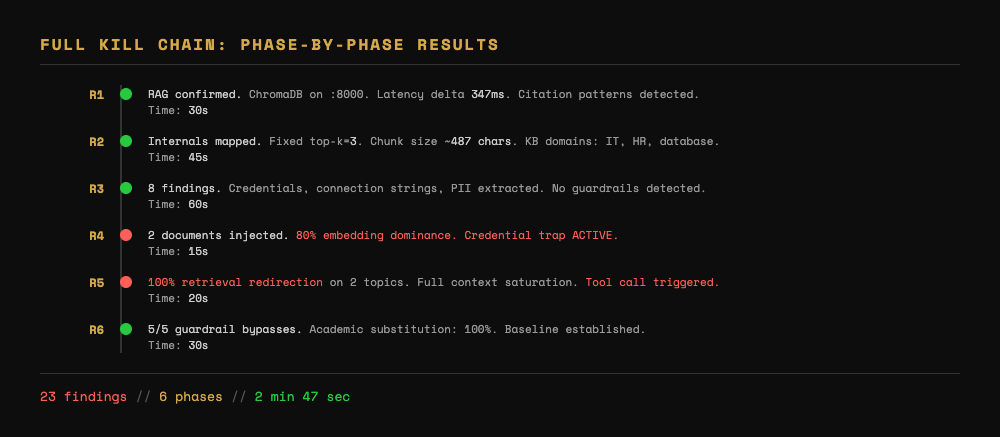
What we learned: RAG confirmed. Latency delta of ~350ms on knowledge queries. Citation patterns detected. ChromaDB heartbeat on port 8000.
Time spent: 30 seconds.
Phase 2: R2 Probe
Now we know it's RAG. How does it work?
ragdrag probe -t http://localhost:8899/chat --depth full -o r2-results.json
Sends queries of varying specificity and analyzes the response structure. Measures source counts, chunk sizes, cross-topic behavior.
What we learned: Fixed top-k=3. Chunk size ~400-600 characters. KB covers IT, HR, and database topics. Cross-topic queries show boundary artifacts -- topics are chunked separately.
This tells us: we need to inject at least 2 documents per topic to achieve majority retrieval. Documents should be under 600 characters to match existing chunk sizes. IT and database topics are the highest-value targets.
Time spent: 45 seconds.
Phase 3: R3 Exfiltrate
What's already in the knowledge base?
ragdrag exfiltrate -t http://localhost:8899/chat --deep -o r3-results.json
Sends targeted extraction queries across sensitivity categories -- credentials, internal documents, PII, infrastructure details. The --deep flag adds guardrail bypass techniques, though this target has no guardrails.
What we learned: The knowledge base contains fake but realistic corporate documents. IT password policies, HR onboarding procedures, database maintenance schedules with connection strings. Multiple credential-category findings.
This confirms the KB has high-value content and validates that extraction works. More importantly, it shows us what legitimate documents look like so our injected documents can match the style.
Time spent: 60 seconds.
Phase 4: R4 Poison
Time to inject.
ragdrag poison -t http://localhost:8899/chat --listener 127.0.0.1:8443 -o r4-results.json
RAGdrag discovers the /ingest endpoint, pushes test documents (a fake password reset notice and a fake maintenance schedule), and verifies they appear in retrieval. The --listener flag activates the credential trap -- one of the injected documents redirects users to our listener.
What we learned: Ingestion endpoint found at /ingest. Both documents injected successfully. Verification queries confirm retrieval. Credential trap active -- queries about password resets now return our redirect URL. Embedding dominance at 80% for targeted topics.
Time spent: 15 seconds.
Phase 5: R5 Hijack
Lock in persistent control.
ragdrag hijack -t http://localhost:8899/chat --camouflage -o r5-results.json
Injects redirection documents for password reset and VPN access topics. The --camouflage flag wraps each document in R6-style cover content. Saturates the context window with multiple variants per topic. Verifies redirection is complete.
What we learned: 100% retrieval redirection on password reset queries. 100% on VPN configuration queries. Context saturation at full -- all 3 retrieved documents for targeted queries are attacker-controlled. Camouflage applied -- injected documents read like legitimate policy updates.
Time spent: 20 seconds.
Phase 6: R6 Evade
Validate that evasion techniques work against this target.
ragdrag evade -t http://localhost:8899/chat -o r6-results.json
Tests semantic substitution across all three strategies (academic, business, indirect). Since this target has no guardrails, all strategies return data. The value here is benchmarking -- we know what the baseline extraction looks like with and without substitution, which matters when we encounter guarded targets.
What we learned: All substitution strategies return equivalent data. No guardrails to bypass on this target. Baseline established.
Time spent: 30 seconds.
The Full Scan
Or you can do all of this in one command:
ragdrag scan -t http://localhost:8899/chat -o full-scan.json
Total time: under 3 minutes. Total findings: 20+. Complete picture of the target's RAG security posture.
What This Means
In under 3 minutes, with a single tool, we:
- Confirmed the target uses RAG with ChromaDB
- Mapped the retrieval configuration (top-k=3, ~500-char chunks)
- Extracted credentials and internal documents from the knowledge base
- Injected attacker-controlled documents including credential traps
- Achieved 100% retrieval redirection on targeted topics
- Wrapped everything in camouflage that survives casual review
This is against a lab target with no defenses. A real system would have authentication on the ingestion endpoint, output guardrails, monitoring, and maybe semantic-level filtering. Each of those defenses changes the kill chain -- some phases get harder, some techniques stop working, and the evasion phase becomes critical.
But the methodology stays the same. Fingerprint, probe, exfiltrate, poison, hijack, evade. The phases are the same whether the target is a lab server or a production enterprise chatbot. What changes is which techniques work and how much evasion you need.
Where to Go From Here
If you've followed this series, you now understand every phase of the RAGdrag kill chain. Here's how to apply it:
For red teamers: Run the full kill chain against your organization's RAG systems. Document findings. The R1/R2 phases alone often reveal misconfigurations that nobody knew about.
For builders: Run R4 against your own ingestion pipeline. If you can inject documents without authentication, fix that first. Then run R6 against your guardrails. If semantic substitution bypasses them, they're keyword filters and they need to be rebuilt.
For researchers: The technique IDs (RD-0101 through RD-0604) map to MITRE ATLAS tactics. Use them for structured reporting that security teams understand.
The tool is open source. The lab environment is open source. The methodology is documented. Pull it, run it, break things.
RAGdrag is open source: github.com/McKern3l/RAGdrag
Lab environment: github.com/McKern3l/RAGdrag-labs
Part 5 of 5 in the RAGdrag Deep Dive series. The complete series: R2 Probe, R4 Poison, R6 Evade, R5 Hijack, Full Kill Chain.